
A place for your stock,
your bookings and your next move.
Show what you rent. Check what is available. Bring the request, the agreement and the work into one place.

Your rental shop
A page with your name, your rentals and your prices. Share your whole shop or send someone straight to the item they asked about.
- Photos, prices and details for each rental
- Categories, packages and a live shop editor
- Shop, listing and owner-branded offer links

Your Weekend Rentals
Tents, tables and chairs for your next gathering.
A shop example. Choose your own photos, prices and details.
Stock & availability
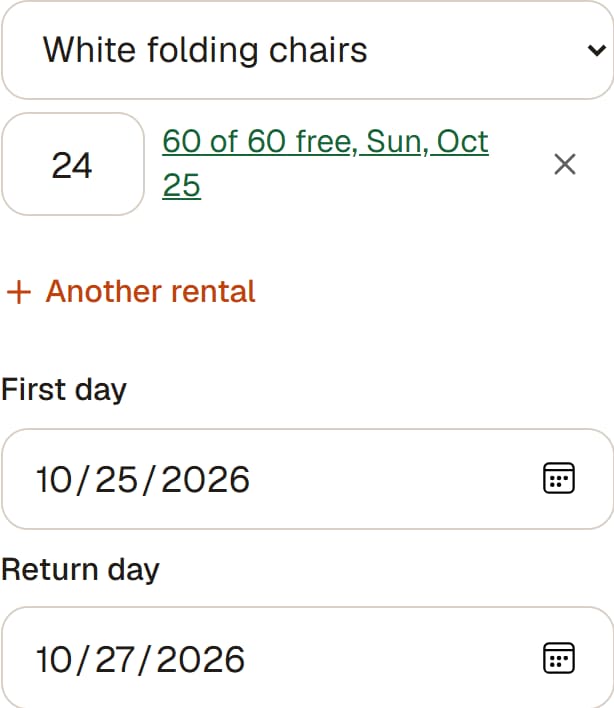
Check the rental dates and the quantity before you answer. See the available stock while you build the offer.
- Available quantities for the dates you choose
- Blackouts and separate handover days
- Owned stock and extra quantities to source stay distinct
Reservation timing follows your shop's hold policy. Extra capacity needs explicit authorization within your cap and separate sourcing.
Requests & quotes
Start with a shop request or create an offer for an enquiry from a message, phone call or conversation.
- Rentals, packages, services and discounts in one offer
- Saved drafts and a preview before sharing
- Review-first approval or your shop's deposit hold policy
Sending a shop request requires sign-in with Google or an emailed confirmation link. Your owner-created offer supports a guest response with contact details.
A quote for one rental
Example: the customer can review the full plan before responding.
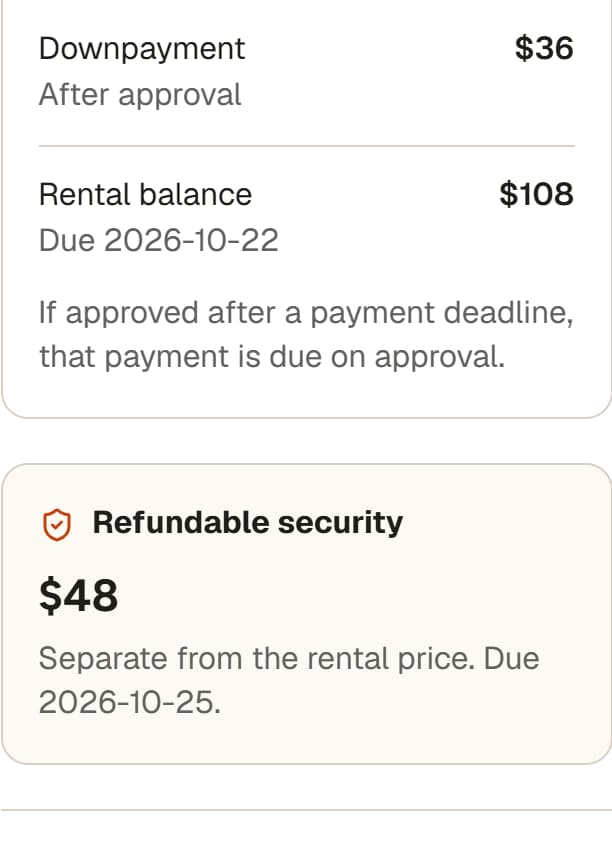
- 24 folding chairs, 2 days
- $144
- Booking deposit
- $36
- Remaining rental balance
- $108
- Refundable security, separate
- $48
Your prices, services, terms and payment schedule travel with the offer.
Follow the offer through one rental →Bookings & daily work
Once the rental is agreed, keep its dates, messages, delivery work and next actions with the booking.
- Bookings arranged in RentStand or elsewhere
- Delivery, collection and setup on Home and Calendar
- Customer conversations, attachments and booking progress
- Calendar subscriptions, reports and exports
One booking. Three days of work.
Example: handover days and billed rental days have different jobs.
- Friday afternoonDeliver and set up
The tent, tables and chairs arrive before the event.
- SaturdayThe rental day
The agreed rental period and price stay visible.
- Sunday afternoonCollect and record the return
Keep the return and security outcome with the booking.
Payments & balances
Keep the booking deposit, remaining rental balance and refundable security separate. See the amount and timing without losing the booking context.
- Record cash or transfers after you receive them
- Keep invoices and payment history with the rental
- Show your tax rates and registration details
Renters pay you directly through a method you accept. A renter reporting money sent is not confirmed receipt. RentStand does not move the money. Online payment-provider integrations are planned.
FOLLOW THE WORK
All features
Explore what you can do at each stage. Search for a detail when you need it.
70 features
01Set up your shop
Your own page at rentstand.co
Your shop lives at rentstand.co/@yourname. One link, your name in it, yours to send.
A page of its own for every thing you rent
Each thing gets its own page, with its own photos, its own price and its own dates.
Your name, your town, a line about you
Say who you are and where you rent from. That is what makes it read shop, not stranger.
Your phone number, handed over only when you say yes
Renters get your number after you approve their dates, not before. Until then your page does the talking.
Your link, ready to send
One tap opens your phone's share sheet, or copies the link if you are on a computer. Text it, post it, put it wherever people ask.
Classic and Marquee shop designs with a live website editor
Choose a starting design, edit your shop, and see changes before publishing.
Shop categories and category photos
Group related rentals so customers can find what they need.
Shop-branded offer pages and short sharing links
Share an offer that leads with your shop name and a shorter link.
02Put your things on it
Photos straight from your phone
Up to ten per thing. They are shrunk before they leave your phone, so a big photo does not mean a slow page.
An honest state when there is no photo yet
A listing without a photo shows a plain card that says so and points renters at you, instead of a broken image.
Price per day
Set what a day costs. That is the only price you have to set.
A weekend rate
Charge one price for a rental whose days all land on Fri, Sat or Sun. Renters pay that or the day by day total, whichever comes out less.
The shortest and longest you will rent it for
Two days minimum, two weeks maximum, whatever suits the thing. Leave the maximum blank and there is no limit.
How many you have
Track the quantities you own across overlapping rentals. Extra quantities need explicit authorization within your cap and still need to be sourced.
A description, in your own words
What it is, what shape it is in, what people usually use it for.
House rules on the thing itself
What renters should know before their dates. It travels with every booking, so you never explain it twice.
A separate refundable security deposit
Renters see the refundable amount before they book. It stays separate from the rental charge, and any return or deduction is recorded.
A different downpayment for one expensive thing
Your shop has one downpayment rule. If a marquee should hold more than a popcorn machine, give that one thing its own amount.
Optional 7-day and 30-day rental rates
Set longer rental rates alongside the daily and weekend prices.
Fixed rental packages with their own prices
Bundle rentals into a package with one price.
Draft, published and archived listing states
Prepare items privately, publish them, or take them out of circulation.
Desktop catalogue editing across multiple listings
Make routine listing changes from a wider catalogue view.
03Take the booking
Renters confirm their email before sending a shop request
They browse and choose dates freely, then sign in with Google or an emailed confirmation link to send. Owner-created offer links support guest responses with contact details.
You approve or decline from your phone
Review the request, check the details and say yes or no. Booking notices link back to the rental.
Availability checked before confirmation
Check dates and quantities before committing. Owned stock follows your shop's hold policy; extra quantities need explicit authorization within your cap and separate sourcing.
Block your own dates
Going away for the long weekend? Mark the days out and nobody can ask for them.
Adjust the price when you approve, and say why
Adjust the agreed price when approving a request and record the reason with the booking.
Pickup or delivery, chosen per booking
Renters say which one they want when they ask.
What you charge to bring it, written once
Say how far you go and what it usually costs, and set one flat fee that gets added when someone picks delivery.
Rings: different prices at different distances
Draw them on a map. Ten dollars close by, thirty further out. Someone past your last ring still gets a working Send button, and you two settle the drive between you.
Your renter gets a page of their own
Dates, price, your terms, your number, all in one place they can come back to.
Several things in one booking
A renter can ask for the tent, tables and chairs together. It stays one request, one set of dates and one conversation.
Searchable rental and package picker with available quantities
Find the right item quickly and see how many are free for the dates.
Custom offers with saved drafts and a live preview
Build an offer, keep an unfinished draft, and review what the renter will see.
Optional extras and custom work in an offer
Add services, accessories, or one-off work to the rental.
Item, service, package and whole-offer discounts
Apply a discount where it belongs and show it clearly to the renter.
Renter choices on a shared offer before requesting
Let the renter choose eligible options before sending their response.
Record a booking for an agreement made elsewhere
Bring a rental arranged by phone, text, or in person into the calendar.
Separate billed rental days from delivery and collection days
Reserve the handover days without automatically charging rent for them.
Approximate morning, afternoon or evening handover windows
Tell both sides roughly when delivery or collection is planned.
Cancel a booking while keeping its history
Close a booking without erasing the record of what happened.
Booking progress visible to owners and renters
See the current stage and what needs attention next.
04Get paid
A booking deposit toward the rental
Ask for part or all of the rental total, or no booking deposit. Set a fixed amount, a percentage or an amount per item. Any remaining rental balance is separate.
Separate due dates for balance and security
Show when the remaining rental balance and refundable security deposit are due. Renters see the agreed amounts and timing with their booking.
"I sent it" from them, "Got it" from you
They report money sent. You check and record what actually arrived, including partial payments. A sent report is not confirmed receipt; dates follow your shop's hold policy.
Say which ways you take money
Cash, e-transfer, whatever you actually use. Renters see your list and pick one.
Send the deposit back, or hold some of it back and say why
You decide, and your reason reaches the renter in your own words, not ours. The two of you sort it out and we keep the record.
A cancellation policy renters read before they book
Write it once. It is on the page and in the booking email.
Two numbers that tell you how it is going
What you have booked in the last 90 days, and what has actually landed. Dates being held that nobody has paid for yet are named beside the booked figure, never added into it.
Address suggestions and a map for delivery quotes
Find the delivery location and use the owner’s map settings to quote the trip.
Separate delivery, collection and setup charges
Show and adjust service charges independently in an offer.
Owner rules for one trip or item-level delivery fees
Choose how a shared trip and per-item charges appear in an offer.
Inclusive or added tax with multiple named rates
Set the taxes you charge and whether they are included in your prices.
Owner tax registration details on customer documents
Show your tax registration details when your shop charges tax.
Adjustable downpayment and refundable security amounts
Review the suggested amounts and change them for an offer.
Record an amount already received and see what remains
Apply a cash or transfer payment to the booking record.
Booking invoices and payment history
Keep invoices and recorded payments together with the rental.
05Run the day
A dashboard that opens on today
See what is going out, coming back, and needs you today. Switch to the week or month when you need the bigger picture.
Everything you rent in one calendar
A single item spans its booked dates, things you have several of show how many are still free, and bookings with several items stay together.
Reminders that go out on their own
The day before a rental and on the day it comes back, a note goes out. You are not the calendar.
Photos at handover and at return, from both sides
When there is a conversation about a deposit, there is a picture instead of two memories.
Booking notices kept with the conversation
Review recorded notices alongside the rental. Email delivery can need follow-up; the booking page keeps the current facts.
Your shop on your phone's home screen
It opens straight to your dashboard, and there is nothing to download from a store.
Your listings and bookings, yours to download
Download them together as a spreadsheet-ready file whenever you need it. Your business is not trapped here.
One conversation for each customer relationship
Find messages with a renter in one organized place.
Offers, booking updates and payment context in messages
See the relevant rental details beside the conversation.
Share photos and documents in a conversation
Keep files with the messages they explain.
Separate delivery and collection work on Home and Calendar
See both trips on the days they need to happen.
Subscribe to bookings from Google or Apple Calendar
View RentStand booking dates in a calendar you already use.
Booking and payment reports
Review booked work and recorded payments together.
Start with the rentals you already have.
Add one item, one photo, and your price. Keep building from there.